AI Bedroom Design for the Room You Already Have

AI bedroom design starts with the real problem in your room and what must stay. Compare 2–3 refresh directions, then preview one in your own photo before you commit to a change.

AI room design preview afterOriginal room before
Original
Preview

Visual concepts only — verify real-world details before making changes.

Which situation sounds like you?

My bedroom needs to work better, but I’m not sure what to change.

Step 1 of 4

What should this bedroom refresh improve?

Choose the first problem to solve. You’ll set what needs to stay in the next step.

What should this bedroom refresh improve?

See AI bedroom design work on a real room

The clearest way to judge AI bedroom design is to compare a real request with the visual concept it produced. Start with the before-and-after result, then see how Explore helps when the change is not yet clear.

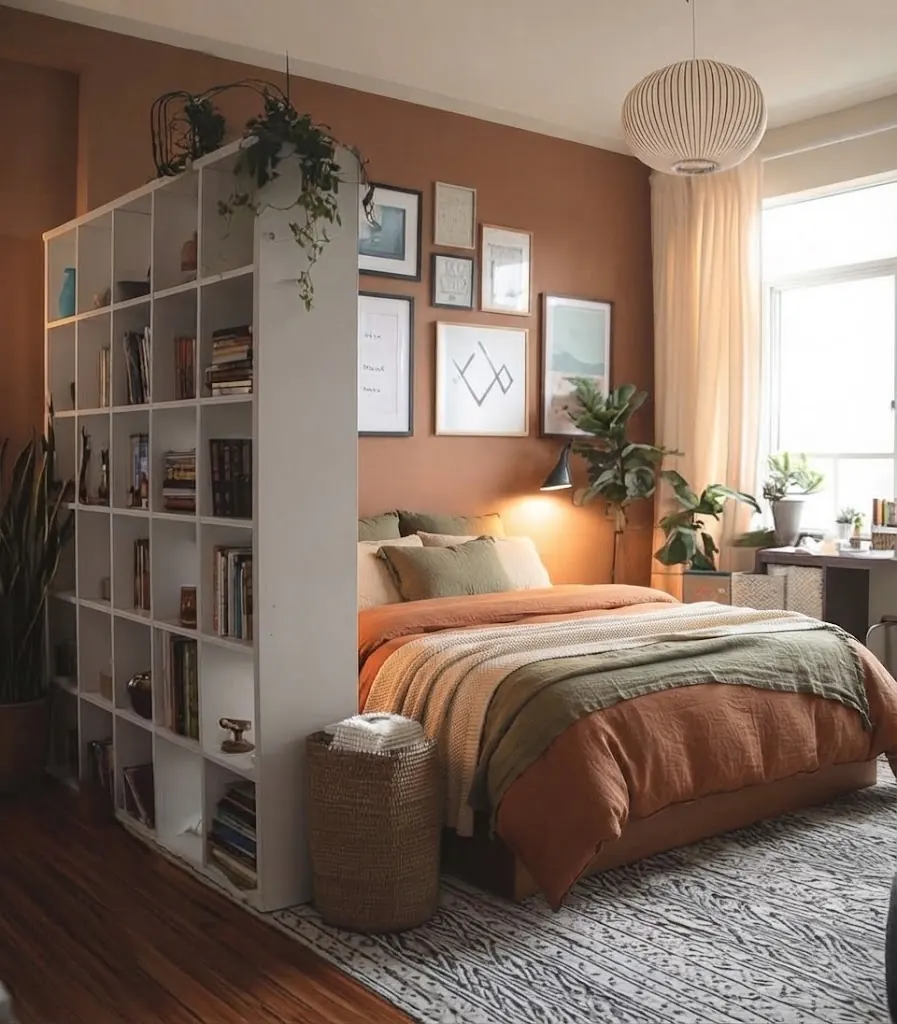
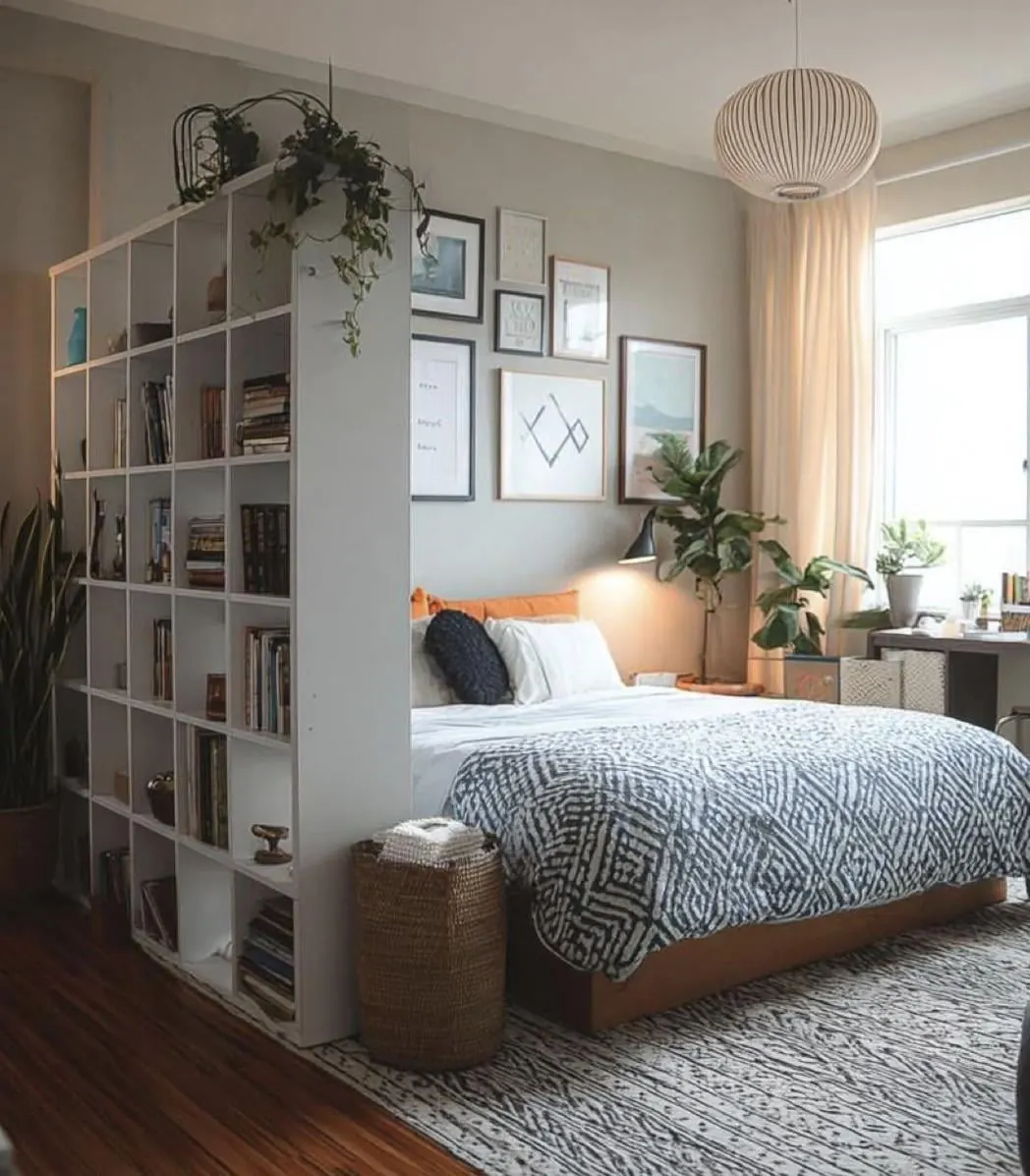
Bedroom visual concept generated by AI Room DesignOriginal bedroom shared by an angel user
Original
Concept

I know I want warmer lighting and terracotta bedding.

What they asked for
Specific request: paint the wall behind the bed deep warm clay; add terracotta, cream, and olive bedding; keep the bed, shelving, windows, and layout.
What AI Room Design previewed
This AI bedroom design preview tests a defined focal wall and bedding palette while prioritizing the bed, shelving, windows, and existing room context named in the request.
View the original Reddit post

These are visual concepts, not floor plans or purchase plans. Verify dimensions, clearances, colors, and products before making changes.

I don’t know what to change first, but I want a calmer bedroom.

What they asked for
Explore brief: a calmer visual atmosphere; keep the bed, windows, and doors; light refresh.
What Explore returns
AI bedroom design returns a small set of directions with different priorities, then you choose one to preview in your photo.

Calm atmosphere

Chosen for preview

Quiet the room with simpler bedding, softer contrast, and a more restful lighting mood.

Trade-off: It prioritizes visual calm over solving every storage problem first.

Low-change warmth

Use layered textiles and warmer light to make the existing room feel more lived in.

Trade-off: It adds comfort while keeping the room’s current visual character.

Storage-first refresh

Reduce visual noise around what stays, so the room feels easier to use and rest in.

Trade-off: It may feel more practical than decorative at first.

Choose one direction, then preview it in your bedroom photo.

How AI bedroom design works

AI bedroom design separates the decision from the image. Build a short brief, compare useful directions and their trade-offs, then spend an image credit only when one direction is worth seeing in your room.

  1. 01

    Brief your bedroom

    Share what the room needs to do, what should stay, and how much change feels realistic.

  2. 02

    Compare directions

    Review two or three text approaches with visible changes and trade-offs before using image credits.

  3. 03

    Generate a visual concept

    Choose one direction, add your bedroom photo, and preview the idea in your room context.

What a realistic AI bedroom design preview can show you

A useful AI bedroom design preview combines a few visible layers while working from the room context you provide. Use it to judge whether a color, lighting, textile, or selected furniture idea deserves a closer real-life check before you spend money.

Color and material

Color and material

Wall colors, paint finishes, wood tones, and fabric palettes are the fastest way to change a bedroom mood. The AI restyles these surfaces while keeping the room's shape.

Lighting and mood

Lighting and mood

See how layered bedside lamps, warmer bulbs, or different window treatments change how the room feels in the evening and in the morning.

Textiles and decor

Textiles and decor

Bedding, rugs, curtains, and wall decor carry most of the visual weight in a bedroom. These changes are often the lowest-cost way to test a new direction.

Furniture swaps

Furniture swaps

Try a different headboard, nightstand, or accent chair while naming the bed, storage, or built-ins the concept should prioritize. Always check the generated placement against the real room.

Why AI bedroom design starts with your room, not a style

Most room design tools start from a blank template and generate a generic showroom photo. AI bedroom design works the other way around: it starts from the bedroom you actually use, then asks what should improve and what the concept should work around. The prompt prioritizes your layout, windows, doors, and named furniture so the preview stays connected to the space you live in rather than inventing an unrelated showroom.

That is why AI bedroom design asks about goals, keep requests, and change levels before it generates anything. Constraints are what make the directions useful: a rental bedroom that cannot be painted needs different ideas than a room you own and want to reset. You compare two or three directions with different priorities, then preview the one that fits your situation.


Bedroom design FAQ

AI bedroom design questions, answered

Start with the problem you recognize. Then use your room, constraints, and priorities to compare a few realistic directions.